Nature Trio: Relax Launcher
- 4.7
- Rating
- 100.00K
- Installs
- Free
- Price

 Analysis by App-foxy
Nature Trio: Relax Launcher is the kind of personalization app I would try when my phone feels visually noisy rather than when I simply want another wallpaper. Its idea is broader than a background image: it combines a desktop launcher with icon tools, wallpapers, and a matching utility, all built around a nature-focused look. After using it, my impression is that its appeal depends less on having endless customization and more on whether you want your home screen to feel deliberately coordinated.
That distinction matters. Many Android launchers are designed around speed, dense controls, app drawers, gesture shortcuts, or deep layout editing. Nature Trio: Relax Launcher takes a calmer route. The short description, “Nature Trio,” points toward a visual theme, while the longer store summary makes the practical scope clearer. You are looking at a free personalization app from Good Products Asarfi, aimed at people who want the launcher, icons, and wallpaper to work together instead of assembling those pieces separately.
I found the concept easy to understand, but the first use can still be slightly confusing because a launcher changes the way the phone opens apps and displays the home screen. That is a more important decision than installing a wallpaper app. If you are comfortable switching between home-screen systems, the process should feel familiar. If you normally leave the manufacturer’s launcher untouched, the permission and default-app prompts deserve your attention rather than hurried taps.
You May Also Like

 Pandora - Music & Podcasts
Pandora’s Music Is Easy to Start, but Harder to Recover
Pandora’s strength is its low-effort path from a seed to a station. Its weak spot is how much confidence it asks you to place in connection, setup, and quiet recovery.

 8 Ball Pool
 Is Built on Rivalries, Rematches, and Routine
A close look at the rivalries, rematches, shared routines, and unanswered safety questions that turn a quick pool match into a persistent mobile community.

 Samsung Music
’s Quiet Strength Is Playing What You Already Own
Its reach comes less from spectacle than from dependable access to a personal library. That simplicity is both the app’s strongest retention engine and its ceiling.

 AccuWeather: Weather Radar
AccuWeather Review: A Quick, Clear Forecast for Everyday Decisions
For everyday plans, the best forecast is the one you can understand quickly. AccuWeather makes rain timing, radar, and local conditions easy to act on, with a few trade-offs.

 Hill Climb Racing
Why Hill Climb Racing Still Turns Crashes Into One More Run
A tiny car, a bumpy hill and one more upgrade: Hill Climb Racing keeps resurfacing because its simple chaos makes every near-miss feel personal.

 AliExpress - Shopping App
AliExpress Makes Global Shopping Feel Personal, but Shoppers Bear the Risk
AliExpress turns a global marketplace into a pocket-sized discovery engine. Its reach is useful, its shopping loop compelling, and its trade-offs easy to miss.
More From Our News Desk
View All News


Getting past the first setup without losing your usual home screen
The most likely place to get stuck is the moment the app asks to become the home experience. Installing it is one thing; making it the active launcher is another. I recommend taking a quick look at your current home-screen arrangement before changing anything. Note which apps sit in your dock, where your essential widgets are, and whether you rely on a particular gesture to reach search or notifications. This small preparation makes it much easier to tell whether a problem comes from the new launcher or from an overlooked setting.
Nature Trio: Relax Launcher runs on Android eight and newer, so compatibility begins with the operating system rather than with a particular phone brand. On a supported device, I would install it while connected to a stable network, open it once, and read each system prompt carefully. The useful question is not “can I get through this quickly?” but “what part of my home-screen behavior is changing?” That mindset prevents the common mistake of assuming that a launcher is just a decorative layer.
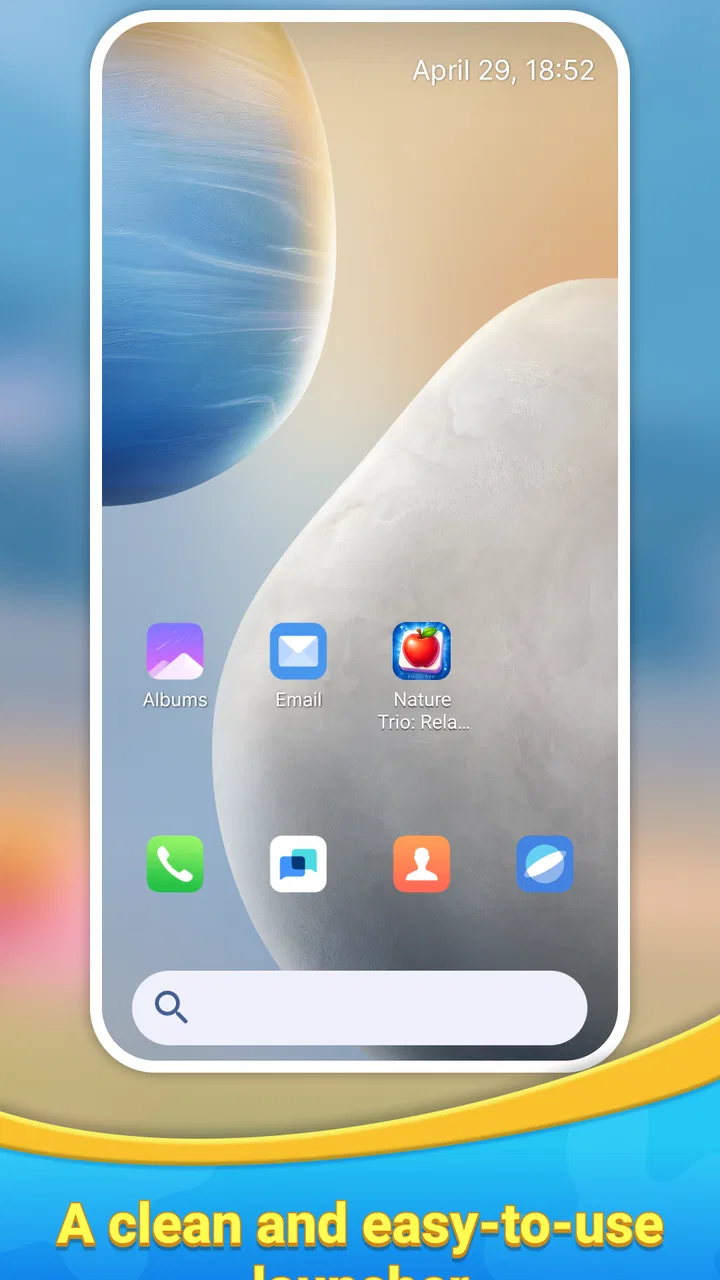
Once the app is open, check the basic visual result before spending time arranging everything. Look at the wallpaper, the icon appearance, the app drawer, and the way the home button behaves. If the nature-inspired presentation is the main reason you installed it, this first pass tells you whether the overall style suits your phone. There is little value in rebuilding your entire layout if the visual direction itself is not to your taste.
A practical setup trick is to start with only one home-screen page. Keep the apps you use every day in reachable positions and leave less important shortcuts alone for the moment. This gives you a clean test of the launcher’s navigation without mixing in a large amount of organization work. It also makes recovery easier if you decide to return to your previous launcher. I prefer this staged approach to immediately recreating every folder and widget.
The icon tools and wallpaper should be assessed as a pair, not separately. A wallpaper can look attractive in a preview but reduce readability behind bright app labels or busy icons. I pay particular attention to the lower portion of the screen, where the dock and frequently used shortcuts usually sit. If the background competes with those elements, a simpler arrangement may feel better than adding more decoration. The strongest result is usually the one that leaves the important apps easy to recognize.
Another useful check is whether your existing widgets still behave as expected. Widgets belong to their individual apps, so a launcher may display them differently without being responsible for the widget’s own loading or refresh behavior. Add back only the widgets you genuinely use, then test them over normal phone use. If one fails while the rest of the home screen works, that points toward the widget or its source app rather than a general Nature Trio problem.
The app is free, which lowers the risk of trying this visual approach. Still, “free” does not remove the cost of your time. Reorganizing a home screen can take longer than expected, especially if you have several pages, folders, and custom widgets. I would not switch immediately before travelling, starting work, or handing the phone to someone who depends on your familiar layout. Try it during a quiet period so you can judge the experience rather than rush through the setup.
What to check when the screen does not look right
If the wallpaper appears but the icons do not feel matched, first check whether the visual change was applied to the launcher’s active home screen rather than only previewed inside the app. A preview is not the same as a finished layout. Return to the home screen, close and reopen it normally, and see whether the appearance remains consistent. This simple check separates an incomplete setup from a deeper display issue.
If the phone keeps returning to the previous launcher, look at the system’s default home-app setting. Android menus differ by manufacturer, but the relevant choice is normally found among default applications or home settings. Selecting Nature Trio there is more reliable than repeatedly opening the app and expecting the system to remember the choice automatically. If the phone is managed by a work profile or a manufacturer-specific interface, that environment may also influence which launcher is allowed to take over.
When icons seem missing, avoid rebuilding the whole screen immediately. Open the app drawer and search for the original application first. The app may still be installed even if its shortcut was not carried over to the new arrangement. Add back only the shortcuts you need, then create folders gradually. This workflow is faster and safer than treating every absent icon as an uninstall or data-loss problem.
For a home screen that feels slow or visually overloaded, remove layers one at a time. Start with extra widgets, then reduce crowded folders or decorative shortcuts, and finally test a simpler wallpaper if necessary. This is not a claim that Nature Trio is causing every performance issue; it is a practical way to isolate what changed. A launcher can make a problem more noticeable simply because it changes the surface you interact with, while the underlying cause may be elsewhere.
Recovering your routine after a layout change
The biggest everyday test for me is not the first impression but the second morning. Can I open my alarm, messages, camera, maps, and music without thinking about where they moved? A realistic example is preparing for work while half-awake: I want the essential apps in predictable locations, a readable background, and no need to search through several pages. Nature Trio: Relax Launcher works best when its calm visual style supports that routine instead of becoming another task to manage.
I suggest creating a small “core” page with only the apps you reach for daily. Put less frequent tools in the drawer or a clearly named folder. This makes the nature theme more visible and reduces the temptation to cover it with rows of shortcuts. It also gives you a useful fallback: if you later decide the launcher is not for you, you only need to reconstruct one important page rather than an entire phone.
When a shortcut seems to vanish after rearranging the screen, search for the app by name and add a fresh shortcut. Check whether the original was moved into a folder or removed from the home screen rather than uninstalled. If a widget disappears, add the widget again through the normal home-screen widget picker. These are ordinary recovery steps, but they matter because a launcher change can make a harmless layout difference feel like a missing application.
Notification behavior deserves a separate check. If notifications arrive normally in the notification shade but a home-screen indicator looks different, the launcher may simply present that information in another way. Compare the actual notification shade with the home-screen appearance before changing notification permissions or reinstalling anything. I prefer this approach because it avoids turning a visual difference into an unnecessary troubleshooting project.
It is also worth testing the back, home, and recent-app controls after setup. These controls are central to the Android system, and a launcher should fit around them rather than force you to relearn the entire phone. If one gesture behaves differently, check the phone’s navigation mode and system settings before blaming the theme. Gesture navigation, three-button navigation, and manufacturer overlays can all change how a home screen feels.
For users who share a phone or frequently hand it to family members, consistency may be more valuable than visual novelty. A child or less technical relative may know exactly where an app is on the familiar launcher. In that situation, I would test Nature Trio on a personal device first rather than changing a shared phone. Personalization is most successful when the person using the phone also controls the layout.
Separating launcher issues from phone and app issues
Not every failure that appears after installation is caused by the new launcher. If an application crashes when opened from both the home screen and the app drawer, the source app or the phone may be responsible. If the whole device is slow in other screens too, storage, background activity, or a system update may be more relevant than the launcher. The useful test is to reproduce the same action from more than one route.
Battery concerns should be judged in the same careful way. A change in home-screen appearance does not automatically explain faster battery drain. Compare ordinary use over a normal period, then inspect the phone’s battery settings to see which apps are actually listed as heavy users. Avoid drawing conclusions from a single afternoon, especially after installation, when you may be spending extra time adjusting the layout and browsing the app.
If the wallpaper looks different from the preview, check the phone’s display settings before assuming the image itself is faulty. Brightness, dark mode, color profiles, adaptive display options, and manufacturer-specific visual enhancements can alter how nature scenes appear. A theme that looks soft on one screen may look more contrast-heavy on another. This is one reason I judge the result in daylight and at night rather than relying on the first glance.
There is also a difference between a launcher’s own presentation and the appearance of apps inside it. Nature Trio can coordinate the home-screen experience, but individual applications may keep their own icons, splash screens, menus, and internal themes. If you expect every screen on the phone to adopt the same nature styling, a launcher alone may not meet that expectation. The app is better understood as a home-screen customization tool than as a complete system-wide redesign.
Users who depend on manufacturer-specific features should be especially cautious. Some phones integrate their own search panels, assistant gestures, edge panels, or special home-screen cards. Switching launchers can change access to those extras even when the core Android functions remain available. Before committing, identify the one manufacturer feature you use most and test whether it still fits your routine. If it does not, the default launcher may be the better choice despite offering less visual character.
The Teen content rating is another practical point for families. That label does not describe every individual screen in the same way, but parents should still review the app themselves before placing it on a younger user’s device. The relevant decision is not just whether the design looks peaceful; it is whether the overall phone setup, including the apps and content accessible from the launcher, suits that user.
Who gets the most from this nature-focused design
I see the strongest fit for people who want a quick visual reset without learning a highly technical customization system. If your current home screen is cluttered, a coordinated launcher, icon treatment, and wallpaper can provide a clearer starting point. The benefit is not only decoration. A consistent visual language can make the phone feel less fragmented, particularly when your existing icons come from many unrelated app designs.
It may also suit someone who changes phones often and wants a recognizable look rather than rebuilding a complicated arrangement from scratch every time. The value here is the concept: the launcher and its visual tools are intended to be considered together. I would still expect some manual adjustment because personal app layouts differ, but beginning with a coherent nature theme is easier than collecting separate wallpapers and icon packs and trying to make them agree.
The app is less convincing for power users who choose a launcher primarily for advanced automation, detailed grid controls, extensive gesture mapping, or a large ecosystem of add-ons. Those users may prefer an established launcher with a deeper control panel, even if it looks less distinctive. Nature Trio’s appeal is its focused presentation, not the promise of turning every part of Android into a configurable dashboard.
It is also not the right choice if you dislike changing your default home app. A wallpaper-only application would be less disruptive for that preference. Likewise, if your work depends on a carefully preserved arrangement of widgets and shortcuts, the time spent checking and rebuilding that layout may outweigh the visual benefit. I would choose this app for a fresh, relaxed home-screen direction, not for a zero-change experiment.
How it compares with familiar alternatives
Compared with using the phone manufacturer’s launcher plus a separate wallpaper, Nature Trio: Relax Launcher offers a more unified starting point. The usual arrangement gives you familiarity and often strong integration with the device, but the wallpaper, icons, and layout can feel like unrelated pieces. Nature Trio is more appealing when visual consistency matters more than preserving every manufacturer-specific convenience.
Compared with a dedicated icon-pack setup, its advantage is simplicity of intent. An icon pack can be more flexible if you enjoy mixing themes and adjusting individual icons, but it may require selecting a compatible launcher and doing more manual work. Nature Trio makes more sense for someone who wants the nature concept to guide the whole home screen rather than spend an evening comparing separate packs.
Compared with a highly customizable third-party launcher, the trade-off moves in the opposite direction. A power-focused alternative may give you finer control over spacing, gestures, folders, search, and backup behavior. That can be the better option for a tablet, a work phone, or anyone with a precise workflow. Nature Trio is preferable when you want the phone to feel calmer quickly and do not need every layout detail exposed as a setting.
The app’s current version is 1.2.0, and its reception is encouraging without being broad enough to treat popularity as proof of universal fit. It has a 4.7 average from around sixty ratings and has passed ten thousand installs. I read that as a sign that the focused idea connects with early users, while also remembering that a smaller audience may not represent every phone model or every Android habit.
My practical verdict after living with the concept
Nature Trio: Relax Launcher succeeds when I treat it as a complete mood and workflow adjustment rather than a single decorative download. The most satisfying result comes from choosing a restrained home page, checking icon readability, and keeping the apps I need close at hand. Its nature-oriented presentation gives the phone a clearer identity, while the launcher format makes the change more noticeable than applying a background alone.
The friction is equally clear: switching launchers affects habits, system defaults, widgets, gestures, and access to manufacturer-specific additions. None of those points makes the app a bad choice, but they mean you should set it up deliberately. Start with one page, test the essential apps, compare notification and navigation behavior, and only then invest time in a full rearrangement. That workflow protects you from mistaking setup work for a permanent problem.
Good Products Asarfi has positioned this as a free personalization app with a focused visual idea rather than an all-purpose replacement for every kind of launcher. For me, that focus is its main strength. If you want a calmer, coordinated Android home screen and are willing to spend a little time checking the transition, it is worth trying. If you need deep automation, strict preservation of your current layout, or seamless access to every manufacturer feature, staying with the default launcher or choosing a more control-heavy alternative will probably be the wiser decision.
My recommendation is therefore conditional but positive. Install Nature Trio: Relax Launcher when you want to simplify the feel of your phone, not when you are searching for the most powerful launcher available. Give it a short, controlled trial with your essential apps, judge the result in real daily use, and keep your previous arrangement in mind before making the change permanent. For the right user, the reward is a home screen that feels more intentional every time the phone is unlocked.
FAQs for Nature Trio: Relax Launcher
01What is Nature Trio: Relax Launcher?
Nature Trio: Relax Launcher is a mobile application designed to transform your smartphone interface into a serene and calming environment. It features nature-inspired themes, wallpapers, and widgets that promote relaxation and mindfulness. The app aims to enhance user experience by providing a visually pleasing and stress-free interface.
02Is Nature Trio: Relax Launcher available for both Android and iOS devices?
Yes, Nature Trio: Relax Launcher is available for both Android and iOS devices. You can easily download it from the Google Play Store for Android or the Apple App Store for iOS. The app is optimized for smooth performance across various devices, ensuring a seamless user experience.
03What features does Nature Trio: Relax Launcher offer?
Nature Trio: Relax Launcher offers a variety of features, including customizable nature-themed wallpapers, relaxing soundscapes, and intuitive widgets. Users can personalize their home screens with different nature motifs, all designed to reduce stress and enhance relaxation. The app also provides an easy-to-use interface for quick access to essential apps.
04Does the app consume a lot of battery or resources?
Nature Trio: Relax Launcher is designed to be resource-efficient. While it provides a visually rich experience, it uses minimal battery and system resources. The developers have optimized the app to ensure that it does not significantly impact your device's performance, allowing you to enjoy the calming features without draining your battery.
05Is there a cost associated with downloading or using Nature Trio: Relax Launcher?
Nature Trio: Relax Launcher is available as a free download with optional in-app purchases. The free version offers a wide array of features, while the premium version provides access to additional themes and customization options. Users can choose to upgrade to the premium version to enhance their experience further.
Pros
- Intuitive user interface for easy navigation.
- Customizable themes to suit your mood.
- Low battery consumption for extended use.
- Includes calming nature sounds.
- Frequent updates ensure smooth performance.
Cons
- Limited widget options compared to competitors.
- Ads can be intrusive during use.
- Requires internet for certain features.
- Limited free features; premium needed.
- Occasional lag on older devices.

Nature Trio: Relax Launcher
Gallery